
Automate the process with the best combination of recurring cost, stable rules, usable data, manageable risk and a clear owner. Do not begin with the process that looks most futuristic. Begin where a complete, reliable system can create measurable capacity.
The scorecard below turns that principle into a decision.
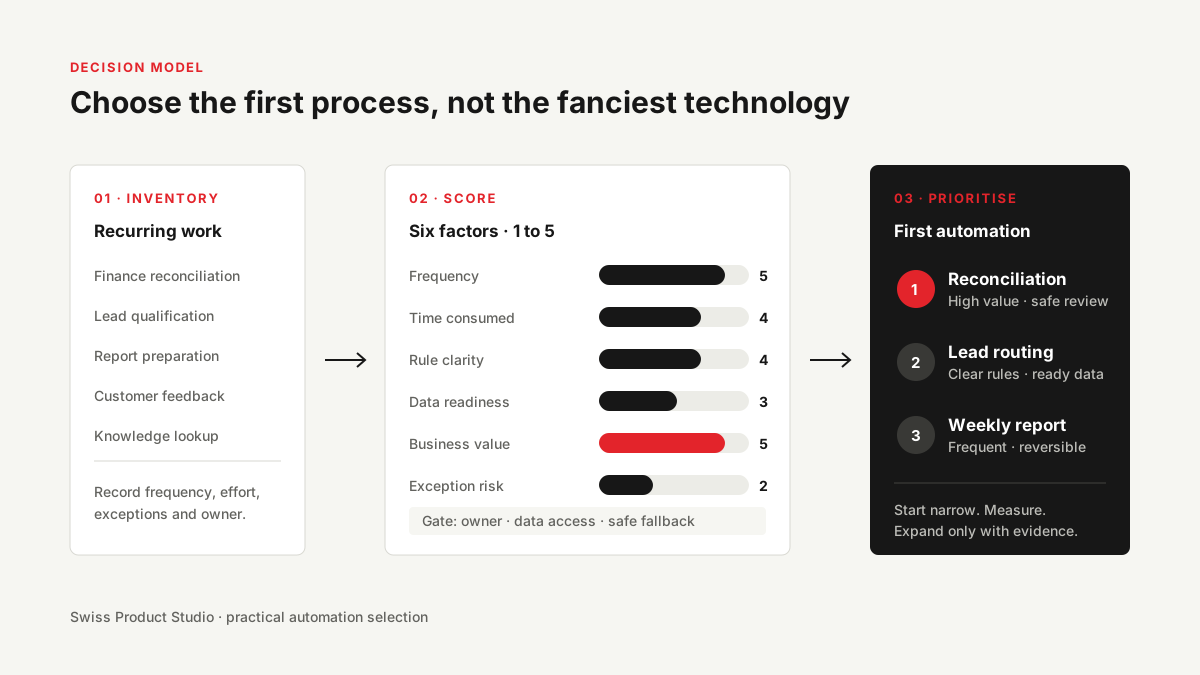
Step 1: Build an inventory of recurring work
Ask each team to list work that happens daily, weekly or monthly. Focus on verbs:
- check;
- copy;
- reconcile;
- classify;
- search;
- prepare;
- remind;
- route;
- report;
- follow up.
Do not start with software. “Automate Salesforce” is not a process. “Create a follow-up task when a qualified opportunity has no next step for three working days” is.
For every candidate, record the trigger, people involved, systems touched, volume, average handling time, known exceptions and current failure cost.
Step 2: Score six factors
Use a one-to-five scale. A high total suggests a strong opportunity, but no score overrides a serious legal, safety or ownership problem.
| Factor | 1 point | 3 points | 5 points |
|---|---|---|---|
| Capacity consumed | Under 2 hours/month | 1–2 hours/week | Several people, every week |
| Frequency | Quarterly or irregular | Weekly | Daily or event-driven |
| Rule clarity | Mostly judgment | Mixed rules and judgment | Clear inputs, rules and outcome |
| Data readiness | Missing or inaccessible | Usable with cleanup | Structured and accessible |
| Failure risk | High and hard to reverse | Reviewable | Low and reversible |
| Implementation effort | New platform or major change | Several integrations | Existing APIs and clear owner |
Calculate a first-pass score:
Opportunity score = capacity + frequency + rule clarity + data readiness + reversibility + ease of implementation
The maximum is 30. Treat 24–30 as strong candidates, 18–23 as candidates requiring discovery, and anything lower as a signal to simplify the process first.
Step 3: Apply three gates
Gate 1: Is the process understood?
If two experienced employees perform the work differently, map the reasons before automating. Variation may reveal missing policy, different customer segments or necessary judgment.
Gate 2: Is there a source of truth?
Every automation needs a clear authority for identity and status. If the CRM and finance system disagree about the customer name, decide which system owns the value and how conflicts are resolved.
Gate 3: Is the consequence acceptable?
Imagine the workflow is wrong for a full day. What happens? A delayed internal report is different from a wrong payment, deleted record or customer message. Reduce scope or add approval until the risk fits.
Good first automation patterns
A recurring report assembled from several systems
This is strong when the report format is stable and the manual work is mainly collection, cleaning and formatting. Keep source links and surface missing data rather than silently filling it.
Finance reconciliation with exception review
Let rules match ordinary records and send uncertain cases to a person. Swiss Product Studio used this pattern in an expense-data pipeline that retained original records and created a separate unified layer for reporting.
Lead enrichment after qualification
Filter before paid enrichment. This reduces provider cost and prevents irrelevant records from entering the downstream workflow. Every asynchronous result must retain its originating company or record ID.
Customer-feedback grouping
Classify incoming feedback, then aggregate it on a deliberate cadence. A weekly view can reveal repeated themes without turning every comment into an alert. See the published AI customer-feedback analysis example.
Weak first automation patterns
Avoid these as initial projects:
- a process with no owner;
- a one-off task described as transformation;
- a high-consequence decision with no review path;
- a workflow whose main input is inaccessible or unreliable;
- a broad “AI assistant for everything”;
- an automation justified only by technology interest;
- a process expected to change completely next month.
Use a two-stage rollout
Stage 1: Assist
The system reads, prepares or proposes. A person reviews every output. This creates evaluation data and reveals edge cases safely.
Stage 2: Automate the proven path
Allow low-risk, well-understood cases to complete automatically. Keep approvals for sensitive actions and route uncertain inputs to the reviewer with context.
The OECD's 2025 work on SME AI adoption stresses that companies have different levels of digital maturity and need differentiated adoption paths rather than one universal playbook (OECD). A staged rollout applies that principle to one company: start at the level the operation can support.
Define success before building
Select one primary outcome and two guardrails.
Primary outcomes might include:
- hours returned each month;
- cycle time reduced;
- backlog removed;
- percentage of records handled automatically;
- follow-up completed within the target window.
Guardrails might include:
- exception rate;
- human corrections;
- duplicate actions;
- failed executions;
- incorrect system updates;
- provider cost per completed item.
Do not use “workflow ran successfully” as the business metric. A technically successful workflow can still produce useless work.
A 60-minute workshop agenda
The output is not a digital-transformation roadmap. It is one defensible next build.
- List ten recurring processes without discussing tools.
- Estimate monthly volume and handling time.
- Mark each process as rules-based, interpretation-heavy or mixed.
- Identify the source of truth and process owner.
- Score the six factors.
- Remove candidates that fail a gate.
- Choose one outcome for the top two candidates.
- Decide which candidate can produce a useful result within a narrow first scope.
Frequently asked questions
Should we automate the process that consumes the most time?
Not automatically. A high-time process with unclear rules or severe consequences may be a poor first project. Capacity matters, but so do clarity, data and reversibility.
Should we automate a broken process?
First remove obvious waste and resolve policy conflicts. Then automate the stable path. Automating confusion makes it faster and harder to see.
When should AI be used?
Use AI where the process needs interpretation of text, documents or context. Use deterministic rules for identity, permissions, calculations and known decision logic.
Choose the process, then the technology
The most valuable discovery question is usually not “Where can we use AI?” It is “Which recurring constraint prevents this team from doing higher-value work?”
Swiss Product Studio starts with that constraint, then builds the appropriate automation, AI agent or internal tool. Bring your top two candidates to a 30-minute operations review and we will pressure-test the scope, risk and expected capacity.