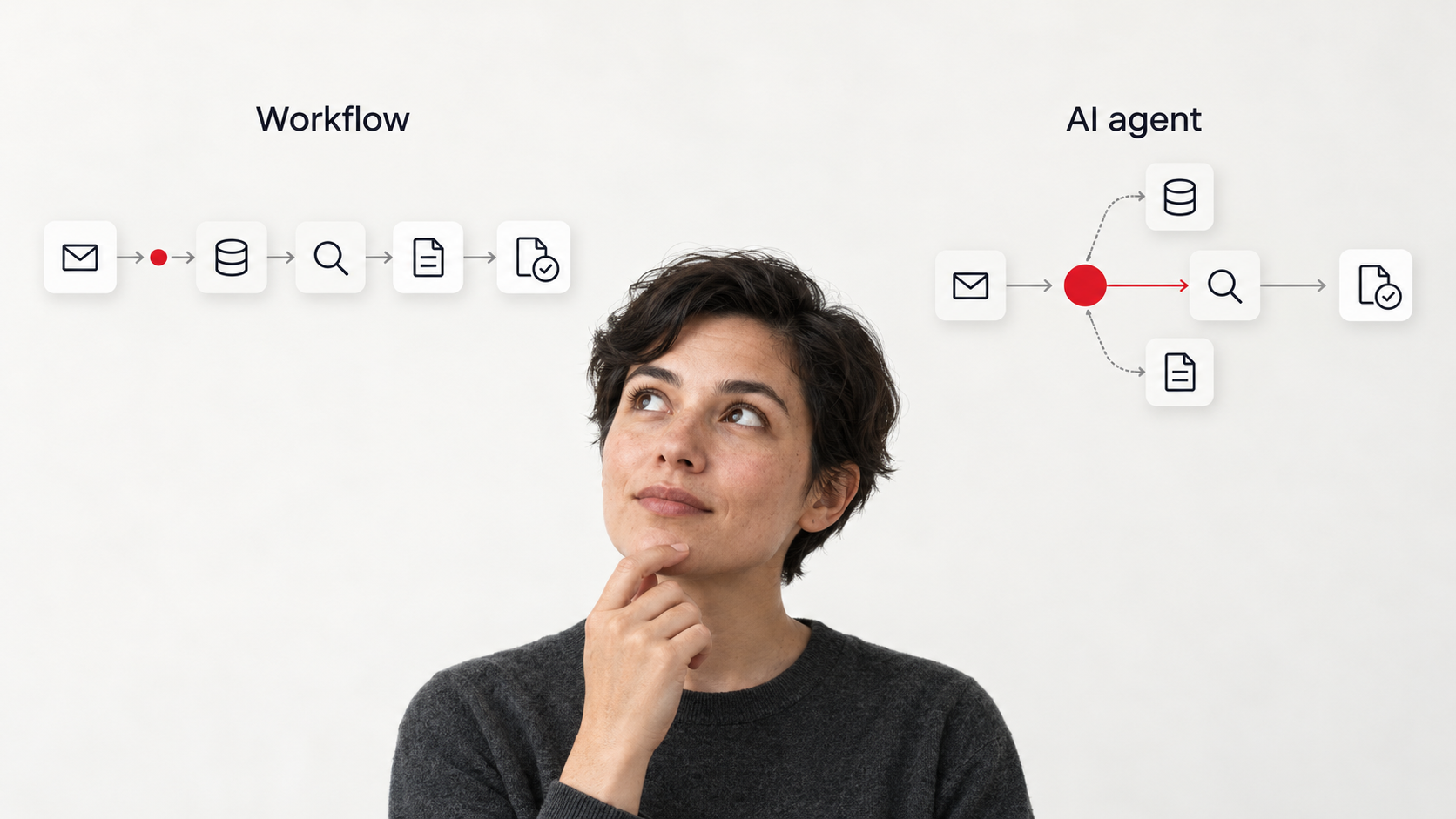
Workflow automation follows paths you define. An AI agent can choose its next action based on the goal and what it discovers. Both can connect your business tools and carry out work. The important distinction is who decides what happens next. 1
A customer emails about a delayed order. Someone checks the order system, looks up the shipment, reads the previous conversation and decides what to do next. Then they write back and update the customer record.
Meanwhile, the customer is waiting. Some of the work follows clear rules; some depends on what the investigation reveals. That difference helps you choose the right automation.
At Swiss Product Studio, our recommendation is to keep known business rules explicit and introduce agent decisions where the work benefits from adaptation. Give the system the freedom the task needs, then measure whether it completes the work correctly and saves your team effort.
What is workflow automation?
Workflow automation uses software to carry out a process through predefined rules, actions and conditions. It starts from a trigger, such as a signed agreement or scheduled time, then moves work between systems. You define the permitted paths, including approvals and what happens when information is missing.
A signed customer agreement could trigger project creation, assign onboarding tasks and prepare billing information. If required details are missing, the workflow asks for them. If an approval is needed, it waits.
Workflows can branch, repeat steps, run tasks in parallel and resume after a pause. They can handle substantial business processes, provided the paths and conditions have been designed. Sam Bhagwat, co-founder of Mastra, describes these dependencies and execution patterns in his talk on combining agents and workflows. 2
A workflow can also use AI. A model could read an email and classify it, or extract information from a document before the next step validates it. The model performs part of the work while the surrounding process remains defined. Adding an AI call does not automatically make the whole system an agent. 1
What is an AI agent?
An AI agent is software that uses an AI model to choose actions while working towards a goal. It can use approved tools, inspect the results and adjust its next step. Its instructions and permissions define what it may do independently and when it must ask for help.
In the delayed-order example, an agent might find that the carrier has no shipment record. It could then check whether the warehouse dispatched the order, discover a missing item and prepare a response explaining the situation. A different order could lead to a different investigation.
The basic cycle is choose an action, use a tool, inspect the result, then continue, stop or ask for help. Dex Horthy, founder of HumanLayer, explains this as a combination of instructions, tool execution, context and an execution loop. 3
The agent's freedom can be limited. Permission to investigate and draft a response does not have to include permission to send it, issue a refund or change an order.
AI agents vs workflow automation: the key differences
| Decision | Workflow automation | AI agent |
|---|---|---|
| What directs the work? | Rules and paths defined in advance | A goal, instructions and model-selected actions |
| What happens after a result? | The configured next step or branch runs | The model can choose how to proceed |
| Where does it fit? | Understood processes with clear conditions | Investigations and tasks whose steps vary |
| How are exceptions handled? | Through designed exception paths or escalation | The agent may investigate further within its permissions |
| What needs checking? | Rules, integrations, data and failure handling | Those foundations, plus model decisions across repeated cases |
These are differences in control, rather than guarantees of quality. A workflow can reliably copy incorrect information. An agent can conduct a plausible investigation and reach the wrong conclusion.
Harrison Chase, co-founder of LangChain, makes the control question concrete: if one step must always follow another, encode that requirement in the process. A prompt asking the model to remember the sequence is a weaker control. 4
When should you choose workflow automation?
Choose a workflow when you understand the steps, the conditions and the expected result.
Creating records from approved forms, synchronising systems, routing expenses by amount and sending scheduled reminders are good starting points. The work can involve many steps without needing the model to decide their order.
Dex Horthy describes spending roughly two hours refining an agent's instructions to build a software project correctly. Eventually, his instructions specified the exact sequence. He realised he could have written a short script in about 90 seconds. This is his personal example, but the lesson applies beyond software: when the task already has a clear recipe, implement the recipe. 3
For a business, the gain may be fewer handoffs, less copying between tools and less work waiting for someone to remember the next step. A straightforward workflow can remove a recurring bottleneck without adding model decisions to it.
When should you use AI agents for business?
Consider an agent when you can define a useful outcome, but the investigation needed to reach it changes from case to case.
Supplier research is one example. One supplier publishes all the information you need. Another requires checking several documents. A third gives conflicting answers that need further investigation. An agent could adapt its research and prepare a comparison with supporting sources.
Other possible AI agent use cases include investigating customer issues, preparing meeting briefs from several systems and resolving ambiguous records. These are illustrative applications, not reported SPS client results.
Unstructured information alone is not enough reason to choose an agent. Reading an invoice may need a single extraction step followed by validation. The stronger reason is that intermediate findings change what the system should do next. Anthropic identifies open-ended work with hard-to-predict steps as a useful fit for agents. 1
You still need a clear finish: what must the result contain, which sources and tools may be used, and when should the system hand the task back?
How can AI agents and workflow automation work together?
Agents and workflows share much of the same operational foundation. Both can connect to business systems, keep track of progress, respond to events and involve people. Both need monitoring and a way to handle failed work.
They can also call each other. An agent can perform one step inside a workflow. A workflow can become a tool that an agent uses when it needs a particular job completed. 2
For the customer enquiry, a proposed design might be:
- A workflow receives the email and identifies the customer.
- An agent investigates the issue using approved records and tools.
- The agent prepares a response with the evidence behind it.
- A person reviews any proposed refund or unusual commitment.
- The workflow sends the approved response and records the outcome.
Dex describes a comparable division of responsibility in HumanLayer's deployment process. Conventional code handles much of the pipeline. An agent proposes deployment actions and adapts to human direction. Execution then returns to conventional testing. 3
This is also a reason to build reusable workflows. A well-defined process can serve several parts of the business and become a controlled tool for an assistant. We explore that approach in our n8n vs Make comparison.
What do AI agents and workflow automation cost?
The platform subscription or model bill is only part of the cost.
Business process automation needs process mapping, integration, testing and ongoing support. Business rules change. Connected applications change. Someone needs to own the exceptions and keep the process working.
An agent also needs repeated tests of its instructions, tools and decisions. Usage costs can vary between cases because the number of model calls, searches and retries can change. AWS recommends assessing the complete operating cost, including infrastructure, model usage, operations and human oversight. 5
A higher-cost run can still be worthwhile if it completes valuable work. Equally, a cheap run can be poor value if someone must rebuild its result.
Measure cost per correctly completed case. Include software and usage, maintenance, human review and correction time. Compare that with the current process.
For an illustrative calculation, suppose a task takes 30 minutes manually. The new process needs five minutes of preparation and ten minutes of review. Across 100 cases, that releases 25 hours of capacity. It does not automatically save 25 hours of salary: the commercial benefit depends on how the team uses that time and what the system costs to operate.
What are the risks of AI agents and workflow automation?
A workflow can fail because a connection breaks, a rule is wrong or an unexpected case has no suitable path. An agent adds uncertainty about which actions the model selects and whether its interpretation is correct.
Dex describes agents getting stuck when repeated tool errors accumulate in their context. Managing what the model sees and when execution stops is part of building a reliable system. 3
Permissions determine how far a mistake can spread. Reading a record, preparing a change and applying that change are different responsibilities. NIST warns that broad access can allow agents to use unexpected tools or data and cause unintended damage. It recommends tightly scoped authorisation and careful credential management. 6
For an initial system, we recommend limiting access to the task, setting time and usage limits, recording actions and requiring review before consequential changes. Plan how failed work reaches a person and how completed actions can be checked or reversed where possible.
Human review should happen at useful checkpoints. Harrison describes the value of a substantial first draft: the agent completes meaningful work, then a person assesses the result. Requiring approval for every tiny step can consume the capacity you hoped to gain. 4
What business benefits can AI automation deliver?
Workflows can create capacity by making recurring work happen consistently. Agents can extend that capacity into investigation, interpretation and preparation that previously required someone to direct each step.
The opportunity could be faster customer responses, more proposals prepared, a shorter research backlog or better information available before a decision. Measure those outcomes in your own process before treating them as a return on investment.
Harrison frames the decision around three questions: how valuable is a correct result, how likely is success, and what does failure cost? The expected benefit must exceed the cost of running the system. 4
An agent also does not need to wait in a chat window. It can start from an incoming event and prepare work in the background while retaining approval points. That can make it more useful within an existing operation, provided the scope and responsibility are clear. 4
Can AI workflow automation extend your existing processes?
AI workflow automation can add interpretation or content generation to a process you already use. For example, an AI step can classify an enquiry while existing rules handle assignment, approvals and record updates. Introduce an agent only where choosing the next action adds value. Existing workflows can also become tools the agent calls. 1 2
Start with one process you can measure
Choose a recurring task with a clear owner. Record how long it takes, where work waits and what causes rework. Separate the steps with known rules from those that need investigation.
Build the smallest useful version and test it on ordinary cases as well as difficult ones. Measure accepted results, review effort, completion time and total operating cost. Expand the system's responsibilities only when that evidence supports it.
To turn this into a first project, download Your first automation plan. The eight-page fillable kit helps you choose one recurring task, estimate its value and define a practical first step. Enter your personal LinkedIn profile URL to download it.
Swiss Product Studio builds AI agents and workflow automation around existing business tools and teams. Bring one recurring bottleneck to a 30-minute operations review. We will look at the work, the tools involved and where a defined workflow or an agent could help.
Sources and further reading
The recommendations and illustrative business examples above are Swiss Product Studio's synthesis. The three talks below were published by AI Engineer in 2025; their examples are the speakers' accounts, rather than independently measured SPS results.
- Anthropic. Building effective agents, December 2024. Definitions of workflows and agents, appropriate use cases and combining patterns. Used for architectural principles rather than current tooling recommendations. ↑1 ↑2 ↑3 ↑4
- Sam Bhagwat, Mastra. Agents vs Workflows: Why Not Both?, AI Engineer, 1 August 2025. 8:18–10:22: workflow dependencies and control; 11:06–13:19: combining agents and workflows. ↑1 ↑2 ↑3
- Dex Horthy, HumanLayer. 12-Factor Agents: Patterns of reliable LLM applications, AI Engineer, 3 July 2025. 1:04–2:06: build-script anecdote; 5:13–7:54: agent execution loop; 10:03–11:58: context and error handling; 12:32–13:36: deployment example. ↑1 ↑2 ↑3 ↑4
- Harrison Chase, LangChain/LangGraph. 3 ingredients for building reliable enterprise agents, AI Engineer, 23 July 2025. 1:59–3:02: expected value and failure cost; 5:32–7:37: explicit control and combined systems; 13:37–17:05: background execution and human input; 19:34–20:48: first drafts and review checkpoints. ↑1 ↑2 ↑3 ↑4
- AWS. AI Agents vs. Automation: A Leader's Guide to Understanding the Difference & Choosing the Right Solution. Decision framework and operating-cost considerations. Accessed 14 October 2026. ↑1
- NIST. Back to the Future: Why Agentic AI Needs a Strong Identity Foundation. Agent permissions, broad access and credential management. Accessed 14 October 2026. ↑1